Whimsical Touches: Using Wedding Doodle PNGs in Your Designs
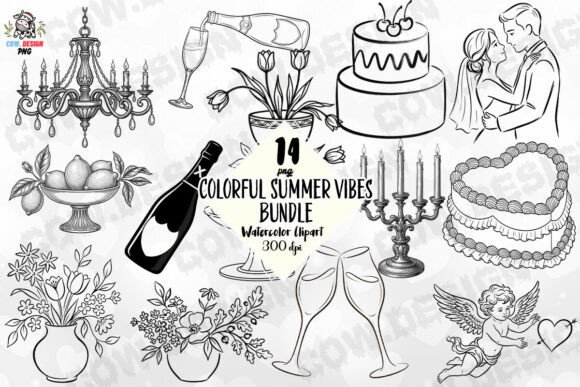
There's a particular kind of charm that hand-drawn elements bring to wedding stationery. They feel personal, intimate, and full of character—like a little note tucked inside the invitation itself. If you've been searching for a way to add that organic, heartfelt quality to your designs without spending hours with a pen and scanner, a Doodles for Wedding Pack PNG might be exactly what your creative toolkit needs. These packs typically bundle dozens of decorative illustrations—think delicate florals, swirling ribbons, ornate frames, lovebirds, hearts, rings, and other romantic motifs—into high-resolution, transparent-background files ready to drop into virtually any project.
What makes these doodle packs genuinely useful isn't just the aesthetic appeal. It's the flexibility. At 4500 x 5400 pixels and 300 DPI, the resolution holds up beautifully for both digital and print applications. That means you can scale these elements for a tiny corner embellishment on a business card or blow them up for a large-format poster without losing crispness. For designers, small business owners, and creative entrepreneurs juggling multiple projects, having a library of ready-made, high-quality design assets like these saves real time and money.
Where Hand-Drawn Wedding Elements Truly Shine
Let's talk specifics. If you're a wedding planner building out a cohesive brand identity, these doodles work wonderfully as recurring visual motifs. Use them on your website headers, sprinkle them through your social media posts, and incorporate them into printed client welcome packets. The consistency of using the same hand-drawn style across every touchpoint builds recognition and gives your brand a warm, approachable personality that couples respond to.
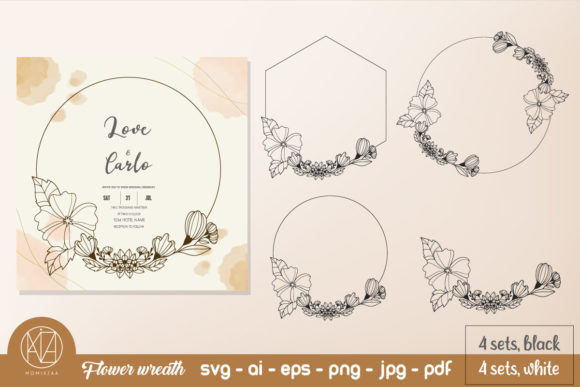
For invitation designers, the applications are almost too numerous to list. Frame a couple's names with intertwined botanical doodles. Add a row of tiny illustrated hearts along the bottom edge of an RSVP card. Use a decorative banner element to highlight the ceremony details. Because these come as transparent PNGs, layering them over textured backgrounds, watercolor washes, or solid color blocks is seamless. No awkward white boxes. No tedious clipping paths. Just drag, drop, resize, and you're done.
Small business owners selling on platforms like Etsy or Shopify will find these packs especially valuable. Imagine designing a line of wedding-themed stickers, mugs, or tote bags. The doodle illustrations give products a boutique, artisan feel that stands out in crowded marketplaces. The same files can feed into your product mockups, listing images, and promotional graphics, creating a unified look across your entire storefront.
Pairing Doodles with Typography for Maximum Impact
A doodle element on its own is decorative. A doodle paired thoughtfully with the right typeface? That's where real design magic happens. Wedding-themed illustrations tend to have a romantic, flowing quality, so they pair naturally with script fonts and handwritten fonts. A sweeping calligraphy font for the couple's names, surrounded by delicate doodle flourishes, creates an elegant focal point on any invitation.
But don't stop there. Contrast is your friend. Pair those ornate doodles with a clean sans serif font for body text—details like dates, addresses, and dress codes. The visual tension between the decorative illustrations and the straightforward typography keeps the design from feeling overly fussy while maintaining readability. This is a principle that experienced brand strategists and editorial designers rely on constantly: balance ornamentation with clarity.
When testing font pairings with your doodle elements, print a sample at actual size. What looks balanced on screen might feel cramped or sparse in hand. Check that the decorative elements don't crowd the text. Leave breathing room. White space isn't empty—it's a design choice that lets each element speak clearly.
From Screen to Print: Getting Professional Results
One of the most common frustrations with downloadable design assets is discovering they look great on screen but fall apart in print. Low resolution, jagged edges, color mismatches—these problems derail projects fast. The advantage of a pack built at 300 DPI and generous pixel dimensions is that print quality is baked in from the start.
Whether you're printing wedding cards at a local shop, ordering custom merchandise through a print-on-demand service, or producing large-format posters for an event, these files hold up. For packaging design, imagine wrapping a small favor box with a pattern made from repeating doodle elements, or adding a single illustrated wreath to a gift tag. The resolution supports these applications without compromise.
A practical tip: always convert your final designs to CMYK color mode before sending them to print. RGB colors—what you see on screen—don't translate directly to ink. What looks like a vibrant coral on your monitor might print as a dull salmon. Most professional print shops will flag this, but getting ahead of it shows you know your craft.
Building a Cohesive Creative Library
For content creators and marketers, wedding doodle elements extend well beyond invitations. Think about blog post headers for a wedding planning website. Instagram story templates for a bridal boutique. Pinterest graphics for a florist. Email newsletter banners for an event venue. The same doodle pack fuels all of these channels, and because the visual style stays consistent, your audience starts associating that aesthetic with your brand.
This is the kind of visual consistency that builds brand recognition over time. People don't just remember what you said—they remember how your content made them feel. Hand-drawn, whimsical illustrations evoke warmth, creativity, and care. If those qualities align with your brand values, leaning into them across your marketing assets and digital products makes strategic sense.
For hobbyists and crafters, the value is more personal but no less real. Scrapbooking a friend's engagement photos? Creating a custom card for a bridal shower? Designing printable decorations for a backyard ceremony? These elements let you produce something genuinely special without needing advanced design skills. Most modern design platforms—Canva, Adobe Express, Procreate—handle transparent PNGs effortlessly.
A Few Things to Keep in Mind
Before you purchase any design asset pack, review the licensing terms carefully. Most premium font and illustration packs come with a commercial license that covers both personal and business use, but specifics vary. Can you use the elements in products you sell? On client work? In digital downloads? Make sure the license matches your intended use. Reputable sellers are transparent about this—if the terms aren't clear, reach out and ask before committing.
Also, take inventory of what's actually included in the pack. A good wedding doodle collection should offer variety: different floral styles, multiple frame shapes, standalone elements, and perhaps some decorative borders or dividers. The more versatile the collection, the more projects you can tackle without feeling repetitive.
Finally, don't be afraid to customize. Recolor doodle elements to match a specific wedding palette. Rotate and flip them for asymmetrical layouts. Combine pieces from different illustrations to create something entirely new. These files are starting points, not limitations. The best designs happen when you treat design assets as ingredients rather than finished dishes—mix, adjust, and taste until it feels right.
Whether you're building a wedding-focused brand, expanding your creative service offerings, or simply making something beautiful for someone you love, having the right visual elements at your fingertips changes everything. It shifts the conversation from "Can I make this work?" to "How do I want this to feel?"—and that's where truly memorable design begins.