Peony Monogram SVG: Hand Drawn Design for Wedding Stationery
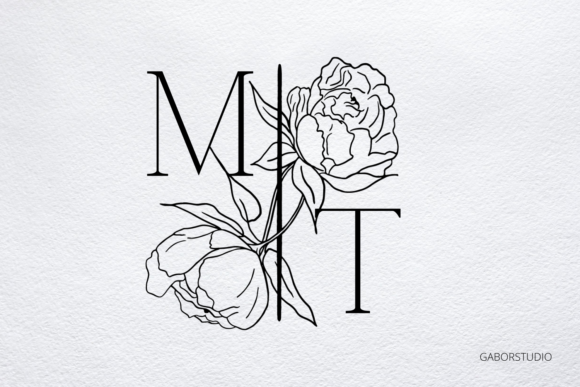
There’s a certain magic in hand-drawn details. It’s the subtle imperfection of a line, the organic flow of a petal, the feeling that a real person’s touch is embedded in the design. This is the essence of the Peony Monogram, a versatile design asset that brings warmth and elegance to your creative projects. It’s more than just a graphic; it’s a starting point for building a cohesive visual story, whether you’re designing a wedding suite, crafting a brand identity, or creating beautiful digital products.
Understanding Your Design Asset: The Power of SVG and PNG
When you download this hand-drawn peony monogram frame, you receive two critical file formats: SVG and PNG. Each serves a distinct purpose in your design workflow, and understanding their strengths is key to using them effectively.
The PNG file is your go-to for projects requiring a transparent background. Think of layering the monogram over a textured paper background in a photo editing program, or placing it directly onto a product mockup. The transparent background means the peony frame integrates seamlessly, without any awkward white box surrounding it. This is essential for clean, professional-looking social media graphics, website banners, and printed materials where the background is not a solid color.
The SVG file, or Scalable Vector Graphic, is where true creative flexibility lives. This format is based on mathematical paths, not pixels. What does that mean for you? It means you can scale this peony monogram from the size of a postage stamp to the dimensions of a billboard without a single loss of quality. The lines remain crisp and clean at any size. This makes the SVG perfect for large-format applications like event signage, posters, and merchandise. It’s also the ideal format for use in vector-based software like Adobe Illustrator or Affinity Designer, where you might want to change the color of specific elements or customize the frame to fit a unique layout.
From Digital File to Tangible Branding: Practical Applications
The true value of a design asset lies in its application. The peony monogram’s elegant, hand-drawn style makes it incredibly adaptable across a wide spectrum of creative projects.
- Wedding and Event Stationery: This is its natural home. Use the frame as the centerpiece of wedding invitations, save-the-dates, RSVP cards, and thank you notes. It creates a romantic, bespoke feel that guests will remember. Beyond weddings, it’s perfect for bridal showers, anniversary parties, or elegant garden-themed events.
- Brand Identity and Logo Design: For businesses in the wedding industry, floral shops, boutique bakeries, or lifestyle brands, this monogram can serve as a foundational logo element. Imagine it framing the initials of a business name on a website header, business card, or packaging sticker. It communicates a sense of artisanal quality and attention to detail.
- Packaging and Product Design: Elevate your product presentation. Use the monogram on labels for handmade candles, soaps, or gourmet foods. It can adorn the belly band on a box of artisanal chocolates or be embossed on shopping bags for a boutique. The hand-drawn quality adds a personal, high-end touch that generic clip art cannot achieve.
- Digital and Social Media Presence: Consistency is key in digital branding. Use the peony frame as a profile picture, a watermark for your photography, or as a recurring graphic element in your Instagram Stories and Pinterest pins. It helps build instant brand recognition and adds a polished, professional layer to your visual content.
- Editorial and Print Layouts: For bloggers, magazine editors, or content creators, this asset can break up text-heavy pages. Use it as a decorative chapter opener, a pull-quote frame, or an illustrative element in a newsletter. It adds visual interest and guides the reader’s eye.
Integrating the Monogram: Tips for Visual Harmony
Having a beautiful asset is one thing; using it well is another. To ensure your peony monogram enhances rather than clutters your design, consider these practical tips.
Font Pairing is Crucial. The monogram’s ornate, script-like nature means it pairs best with simpler, cleaner typefaces. A classic serif font like Garamond or a modern sans-serif like Montserrat can provide a beautiful contrast, ensuring your text remains highly readable. Avoid pairing it with other highly decorative or script fonts, as this can create visual chaos and reduce legibility.
Color with Intention. The file comes in black, which is classic and versatile. However, you can easily change the color in a vector editing program to match your brand palette. Consider the emotion you want to evoke. Soft blush pinks and sage greens enhance the romantic feel, while a deep navy or charcoal gray can make it feel more sophisticated and modern. For a minimalist look, using it in a single, bold color against a clean background can be striking.
Scale and Placement Matter. Let the monogram breathe. Give it ample white space around it so it doesn’t feel crowded. Its intricate details deserve to be seen. Use it as a dominant visual element on a design, not as a tiny, afterthought footnote. Think of it as the star of the show on your invitation or the proud emblem on your packaging.
Test for Readability. If you are placing text inside the monogram frame, choose a font size and weight that ensures the initials or name are clear at a glance. Test your design by printing a small sample or viewing it on a mobile device screen. If the text is difficult to read, simplify the font or slightly increase its size.
A Final Thought on Authenticity in Design
In a world saturated with digital perfection, elements that carry a human touch stand out. The Peony Monogram isn’t just a scalable vector or a transparent PNG; it’s a piece of hand-drawn artistry designed to add soul to your work. Whether you’re a small business owner building a brand from the ground up, a designer crafting a client’s dream wedding suite, or a hobbyist creating beautiful stationery for loved ones, this asset provides a foundation of elegance and authenticity. It’s a tool that encourages you to build visual consistency, tell a more compelling story, and ultimately, create something that feels genuinely yours.